Status
Active = staff can access their course (course hasn't expired yet), but they haven't completed yet.
Not Active = staff can no longer access their course, and they did not complete their course in their allotted time.
Completed = these staff have collected a certificate.
Not Active/Expired (Reenrolled) = these staff have been since re-enrolled in to the same course, but they did not complete this particular enrollment before their time expired for this enrollment.
Completed (Reenrolled) = these staff have been since re-enrolled in to the same course, and they did complete this particular enrollment (and you can see the completion date listed).
Highlighted Students
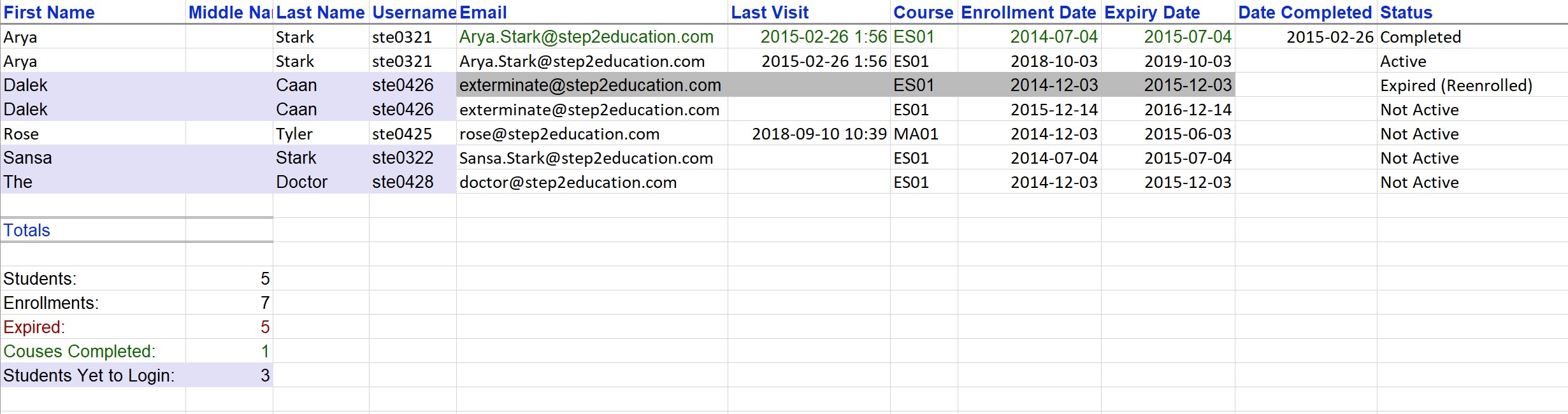
- Students highlighted in blue have not yet logged in to our website for the first time. You can see that in the Last Visit column, they also do not have a date listed.
- Enrollments highlighted in green are completed. You can see in the Date Completed column the day they collected their certificate - which is when we record they have officially completed.
- Enrollments highlighted in grey represent the original enrollment of this student. It helps you identify that they have since been re-enrolled in the same course, but that this one is not their current enrollment.
Enrollment time
Course enrollment time varies, depending on the course the student is enrolled in. Our Essential courses, ES01->ES06 have a 12-month enrollment time. Course time starts from the day of enrollment (not when a student first logs in). Their enrollment date, and expiry date are both listed in the report in the format yyyy-mm-dd.
Facilitators
Facilitators may have their name listed several times. This is because they are generally enrolled in several courses, so you will see a row for each course. Facilitator enrollments cannot be transferred to other staff.
Was this article helpful?
That’s Great!
Thank you for your feedback
Sorry! We couldn't be helpful
Thank you for your feedback
Feedback sent
We appreciate your effort and will try to fix the article