ou may wish to re-enroll a student who was unable to complete their previous enrollment, or because they need a refresher since the last time they completed the course.
Is previous progress kept?
Staff who did not complete their previous enrollment will automatically have their results from the previous assessment attempts rolled over - so they can pick up where they left off.
What is the cost for re-enrolling? How much time will they have?
A re-enrollment is the same cost as a new enrollment. Staff receive a new 12-month access.
Steps for Re-enrolling
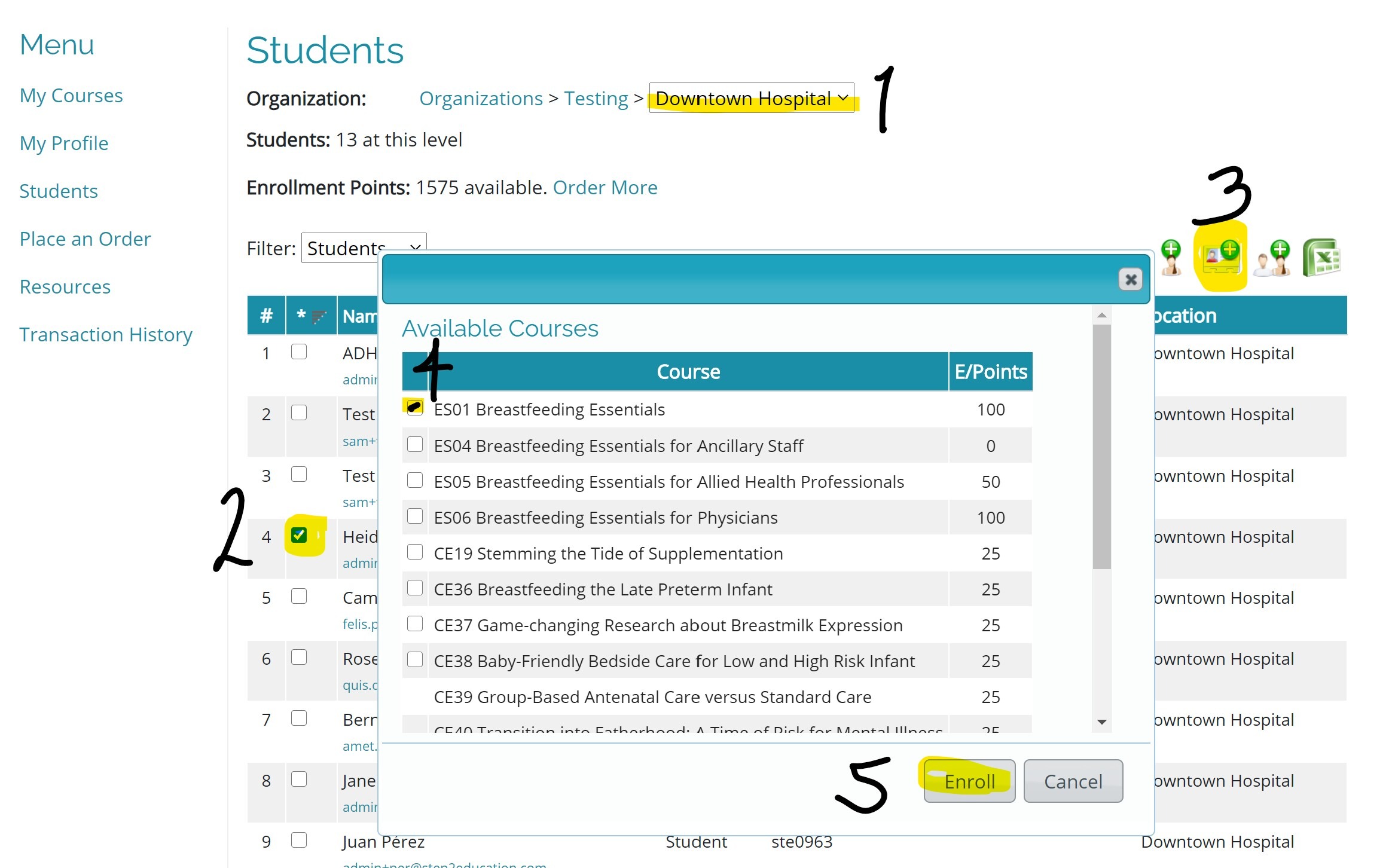
- Log in and navigate to the Students management portal. If you manage multiple departments, use the drop-down menu to select the location of the student you are trying to locate.
- Locate the student you want to re-enroll in the list (if you have lots of students you may need to navigate to the next page using the page numbers at the bottom of the list), and click the checkbox next to their name. Please note, if you have multiple students to re-enroll, if you load a new page of student names, any students you selected on the previous page will be lost.
- Click on the second icon from the left "Assign courses to Student Accounts"
 . This will bring up the course list.
 - Click the checkbox next to the course you want to enroll them in.
- Finally click "enroll".
- If you do not have enough enrollment points in credit, you will be directed to the ordering page where you can either pay right away or request an invoice to pay later.
Staff will receive confirmation of their new enrollment via email. As staff have already previously been issued with a username and password, the system will not automatically issue a new password (in case they are still using their current one!). If the student has lost or forgotten their current user details, they can reset their password online at any time by following these steps.
If you have any difficulties, contact us at admin@step2education.com.
Was this article helpful?
That’s Great!
Thank you for your feedback
Sorry! We couldn't be helpful
Thank you for your feedback
Feedback sent
We appreciate your effort and will try to fix the article